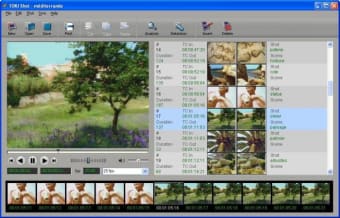
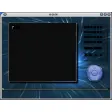
One of the most tedious parts of the video editing process is cutting up your recording into identifiable scenes. TOKI Shot does a pretty good job of relieving you of this painful process. The movie analysis functions quickly identifies scenes in your recording and shows them in a list. You can also increase or minimize screen size by playing around with shot density. What we enjoyed in TOKI Shot is that you can also preview your video and edit parts of your recording or change time cuts manually by typing in a different time.
TOKI Shots is relatively simple to use, but we found it lacks any real explanation, especially for first time users. The fps rate drop down menu is good but it only gives you a choice between 23.976 and 30. We also liked the "delete shots" tools but inserting additional ones didn't really seem to work.
TOKI Shots is specialized in cutting up recordings into scenes and should be useful to people with limited video editors. Those with a top notch video editor probably won't find it necessary though.
Pros
Movie analysis
Set shot density
Lots of export options
Cons
The insert tool
Limited fps rate selection
Lacks proper help
TOKI Shot is a tool for creating shot lists, it can be used for breaking down movies, TV films, documentaries, TV series... It is a tool for picture and sound editors, music editors, musicians and archivists.
It allows the user to:
Create an automatic shot list starting from a cut film, each shot will have a start and end time code and a shot length.
Modify the shot list to add scene names and shot descriptions.
Synchronize the movie with the sound track played in a music software, using ReWire or Midi MTC/MMC.
Export the shot list to music software (E.g. Protools, Cubase, Logic Pro...) using MIDI or sampled sound files.
Export the shot list to picture editing software (E.g. Final Cut Pro, Avid...) using EDL files.
Export the shot list to databases or word processors using formatted text files.
Making a shot list is usually a long and tedious process, but it is an essential prerequisite for cutting sound tracks of movies. By creating a shot list automatically, this long and tedious process becomes a quick and easy task. TOKI Shot allows sound editors and musicians to save hours of tedious work, which can then be spent on creative work.
Laws concerning the use of this software vary from country to country. We do not encourage or condone the use of this program if it is in violation of these laws. Softonic may receive a referral fee if you click or buy any of the products featured here.